How to Create AI Image of Sri Maha Vishnu (Easy Guide)
Creating beautiful devotional art of Sri Maha Vishnu using AI is both an inspiring and accessible process today. In this step-by-step tutorial you will learn how to create AI Image of Sri Maha Vishnu using widely available tools, exact prompts, and simple editing techniques that preserve traditional iconography. This guide is written for beginners and intermediate creators alike. 🙏✨

In this guide, you will learn how to create a Sri Maha Vishnu AI Image using modern AI tools and copy-ready prompts that preserve traditional iconography and devotional detail. Follow each step carefully and try 3–6 variations — small changes to the prompt often give the best final results.
🌟 Why Create a Sri Maha Vishnu AI Image?
Devotional AI images are useful for wallpapers, temple-style graphics, blog art, meditation visuals and social media posts. When made respectfully, they help devotees and artists share cultural stories and worship practices digitally.
🛠️ Best AI Tools to Create a Sri Maha Vishnu AI Image
- 🎨 Midjourney — painterly and detailed results (paid).
- 🖌️ Leonardo AI — fast and color-rich (free & paid options).
- ✨ DALL·E 3 (OpenAI) — accurate and clean compositions.
- 🧠 Stable Diffusion — customizable models and inpainting tools.
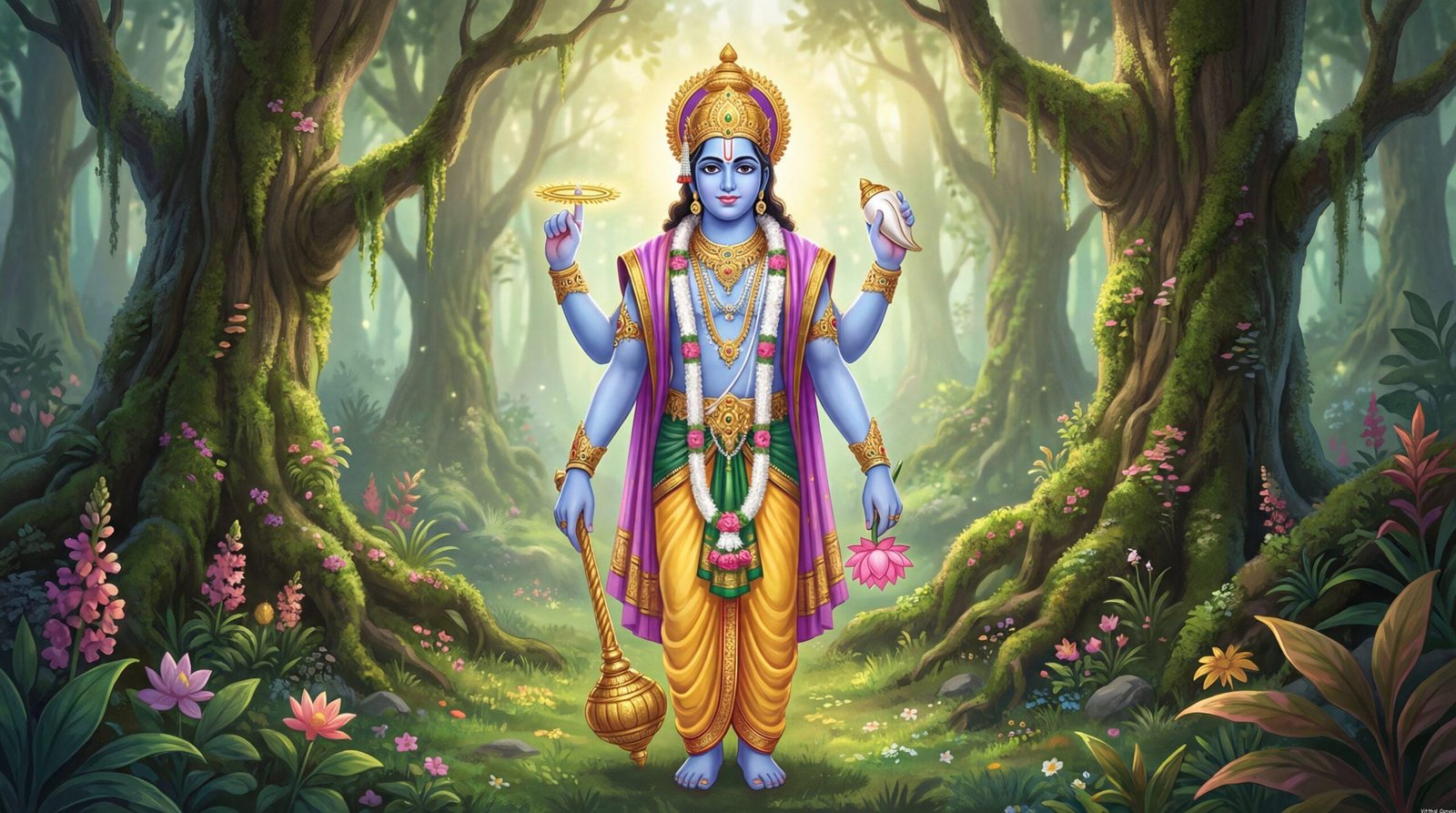
🧿 Vishnu Iconography Checklist (Use in your prompt)
- 💙 Dark-blue (Shyama) sacred skin tone
- 👑 Golden kiritam (crown) with Kaustubha jewel
- 🌀 Sudarshana Chakra (discus) and 📯 Shankha (conch)
- 🌸 Lotus and Gada (mace)
- 🟡 Yellow pitambara with red shawl
- 🔱 Halo, rays of light, mountains and waterfalls background
🪔 Step-by-Step Guide to Create a Sri Maha Vishnu AI Image
1. Choose your tool
For highest artistic quality, use Midjourney or DALL·E 3. For quick experiments and free use, Leonardo AI is excellent. If you want full control (inpainting, custom models), use Stable Diffusion.
2. Set aspect ratio and quality
- Portrait (full-body): 4:7 or 9:16
- Desktop banner / hero: 16:9
- Resolution: generate maximum and then upscale (aim for 2K–4K)
- Style tags: “mythological Indian art”, “devotional painting”, “ultra-detailed”
Prompt to Generate a Sri Maha Vishnu AI Image
Create a highly detailed, devotional digital painting of Sri Maha Vishnu standing on a rocky pedestal with waterfalls and lush green mountains behind him.
Vishnu with dark-blue (Shyama) sacred complexion, serene expression, golden kiritam crown with Kaustubha jewel, tulasi mala and rich golden ornaments.
Four arms holding: Shankha (conch), Sudarshana Chakra (discus), Gada (mace), and Lotus.
Dress him in bright yellow pitambara with a flowing red shawl. Add a radiant halo and sun rays breaking through clouds, soft mist and cinematic warm lighting.
Style: ultra-detailed 4K, mythological Indian art, painterly texture, devotional atmosphere.
3. Generate, evaluate, and refine
Generate 3–6 variations. Inspect for correct iconography and respectful portrayal. If some items are wrong (wrong hands, missing ornament), use inpainting (img2img) or add precise fixes to the prompt such as “correct hand mudras, conch in upper-left hand, chakra in upper-right hand”.
4. Upscale and final polish
Upscale your chosen render to 2K or 4K using the tool’s upscaler or dedicated services (Let’s Enhance, Gigapixel AI). For final touches, use Photoshop or Canva to enhance halo glow, color grading, and soft vignette.
💡 Pro Tips for Better Sri Maha Vishnu AI Images
- Use long descriptive prompts — the more precise, the better.
- Request “Indian mythological painting” to guide style.
- Generate multiple variations — combine the best elements using inpainting.
- Always upscale final selection for prints or wallpapers.
Creating a Sri Maha Vishnu AI Image requires careful attention to cultural detail and visual storytelling. When you describe the jewelry, clothing, and background in your prompt, mention materials (gold filigree, silk dhoti), color tones (warm gold highlights), and mood (serene, majestic). Combining these elements with a proper lighting direction—rim light on the crown, soft ambient mist around the waterfalls—makes the final piece look like a devotional painting suitable for prints or temple-style displays. Test small prompt changes and document which words produce the best result so you can reproduce the style consistently.
📥 Download & Export Recommendations
- Export PNG for high-quality prints.
- Export WebP for faster website loading.
- Keep an original master file (4K) for future edits.
❓ FAQ
Q: Which AI tool is best for Sri Maha Vishnu images?
A: Midjourney and DALL·E 3 give highly detailed painterly results. Leonardo AI is a great free/fast option. Stable Diffusion offers inpainting and custom models for deeper control.
Q: How do I make sure the image is respectful?
A: Use precise, devotional language and include traditional iconography in the prompt. Avoid any modern or casual clothing or objects. When publishing or selling, add a note that the image is AI-generated devotional art.
🔗 Related & Internal Links
Related: Read our step-by-step guide on How to Create AI Image of Lord Shiva for another deity tutorial (update link once post exists).
Following these steps will help you reliably produce a tasteful, detailed and devotional Sri Maha Vishnu AI Image with all the defining attributes and atmosphere of classical mythological art. If you want, I can provide ready-to-use Midjourney prompt presets, inpainting suggestions, or create the final image for you and deliver WebP/PNG exports.